In the fast-evolving world of digital analytics, staying on top of GA4 updates news is essential for businesses aiming to optimize their online presence. Google Analytics 4 (GA4) has revolutionized how we track user behavior, offering deeper insights into customer journeys across devices and platforms. As we enter 2026, recent GA4 updates news highlights enhancements that make data more actionable and privacy-compliant.
Why does this matter? With privacy regulations tightening and user expectations rising, GA4 provides the tools to adapt. Businesses that ignore GA4 updates news risk falling behind in understanding audience engagement and driving growth. This article dives into the latest developments, helping you leverage GA4 for better decision-making.

What Is GA4 and Why It Matters?
Google Analytics 4, or GA4, is Google’s next-generation analytics platform designed to replace Universal Analytics. Unlike its predecessor, GA4 focuses on event-based tracking, machine learning, and cross-device measurement. This shift allows for more flexible GA4 reports and GA4 insights that reflect real user interactions.
The importance of GA4 lies in its ability to provide a unified view of user data. In an era where consumers switch between apps, websites, and offline touchpoints, GA4 tracking ensures you capture the full picture. For marketers and analysts, this means more accurate GA4 insights to inform strategies and improve ROI.
Staying informed on GA4 updates news is crucial because Google continually refines the platform. These changes address user feedback, incorporate AI advancements, and align with evolving privacy standards like GDPR and CCPA.
Key GA4 Updates in 2026
As of early 2026, GA4 updates news has brought exciting enhancements that build on 2025’s foundations. One standout is the launch of Analytics Advisor in December 2025, an AI-powered tool that offers personalized recommendations for optimizing your setup. This feature analyzes your data patterns and suggests improvements, making GA4 more accessible for non-experts.
Enhanced benchmarking is another key update. Now expanded to include over 20 metrics like revenue and engagement rates, it allows businesses to compare performance against industry peers more comprehensively. This helps identify strengths and areas for improvement in GA4 reports.
In terms of GA4 tracking, new integrations for importing cost data from platforms like Meta and TikTok Ads streamline cross-channel analysis. This update simplifies budgeting and attribution, enabling better allocation of marketing spend.
Google has also introduced AI-driven explanations in reports, which annotate anomalies and provide plain-language insights. For instance, if traffic spikes, GA4 now explains potential causes like seasonal trends or campaign impacts.
These GA4 features emphasize predictive analytics, with improved machine learning models forecasting user behavior more accurately. Early 2026 previews suggest further refinements in real-time data processing, reducing latency for time-sensitive decisions.
How to Migrate from Universal Analytics to GA4
If you’re still on Universal Analytics, migrating to GA4 is non-negotiable. Universal Analytics stopped processing new data in 2023, but some legacy setups linger. Start by creating a new GA4 property in your Google Analytics account.
Step one: Link your existing Universal Analytics property to GA4 using the setup assistant. This tool auto-migrates basic settings, but custom events require manual configuration.
Next, update your website or app tracking code. Replace the old gtag.js with GA4’s version, ensuring all events are redefined as GA4-compatible. Test thoroughly in debug mode to catch discrepancies.
For GA4 migration tips, avoid rushing the process. Back up your historical data first, as GA4 doesn’t retroactively import all Universal Analytics metrics. Use dual tagging temporarily to compare data side-by-side.
Common pitfalls include mismatched event names or ignoring enhanced measurement features. Engage a specialist if your setup is complex, and monitor GA4 reports post-migration for anomalies.
This migration unlocks advanced GA4 tracking, like automated event detection, which wasn’t available in Universal Analytics.
GA4 Features and Tips for Marketers
GA4 offers a suite of features tailored for marketers. Beginners should start with the exploration hub, where you can create custom GA4 reports using drag-and-drop interfaces. Focus on key events like page views and conversions for quick wins.
For GA4 tips, enable enhanced measurement to automatically track scrolls, outbound clicks, and file downloads without extra coding. This boosts your GA4 insights effortlessly.
Advanced users can leverage audience builder for predictive segments. Use machine learning to target users likely to churn or convert, integrating seamlessly with Google Ads.
Another tip: Customize your data streams for web, iOS, and Android to get holistic views. Combine this with BigQuery exports for deeper analysis outside GA4.
Marketers love the funnel exploration tool, which visualizes user drop-offs in journeys. Pair it with path analysis for uncovering hidden patterns in GA4 tracking data.

GA4 vs Universal Analytics: Key Differences
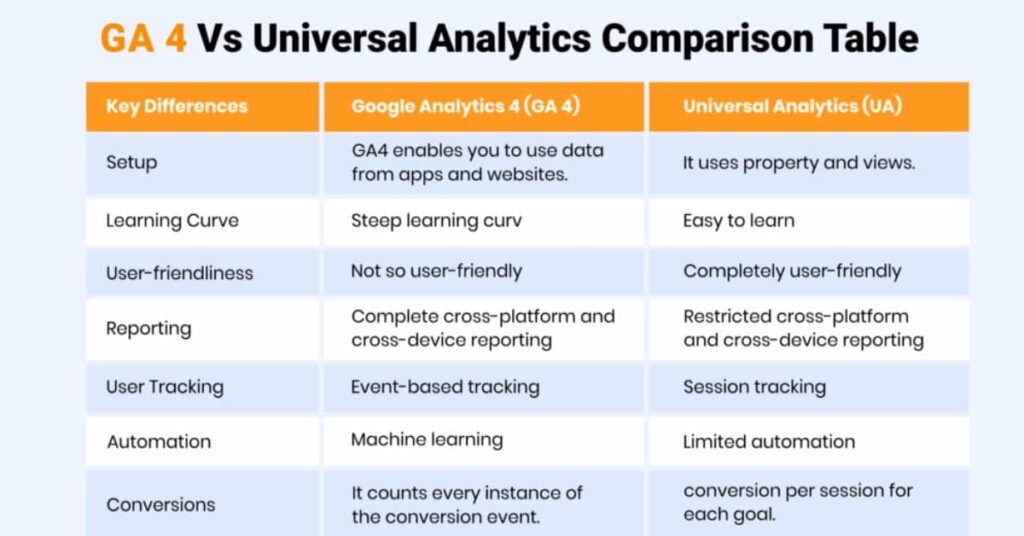
When comparing GA4 vs Universal Analytics, the reporting interface stands out. GA4’s dashboard is more intuitive, with AI-suggested cards and customizable overviews, unlike Universal Analytics’ rigid structure.
Event tracking is fundamentally different. Universal Analytics relied on sessions and hits, while GA4 uses flexible events with parameters. This allows richer GA4 tracking without predefined categories.
Predictive analytics is a GA4 exclusive. Machine learning models forecast metrics like purchase probability, absent in Universal Analytics. This gives GA4 users a forward-looking edge.
Privacy handling also differs. GA4 is cookieless-ready, supporting consent modes and server-side tagging, preparing for a post-third-party cookie world.
Overall, GA4 emphasizes user-centric measurement, while Universal Analytics was page-focused. The shift requires rethinking metrics, but yields superior GA4 insights.
Benefits of Using GA4
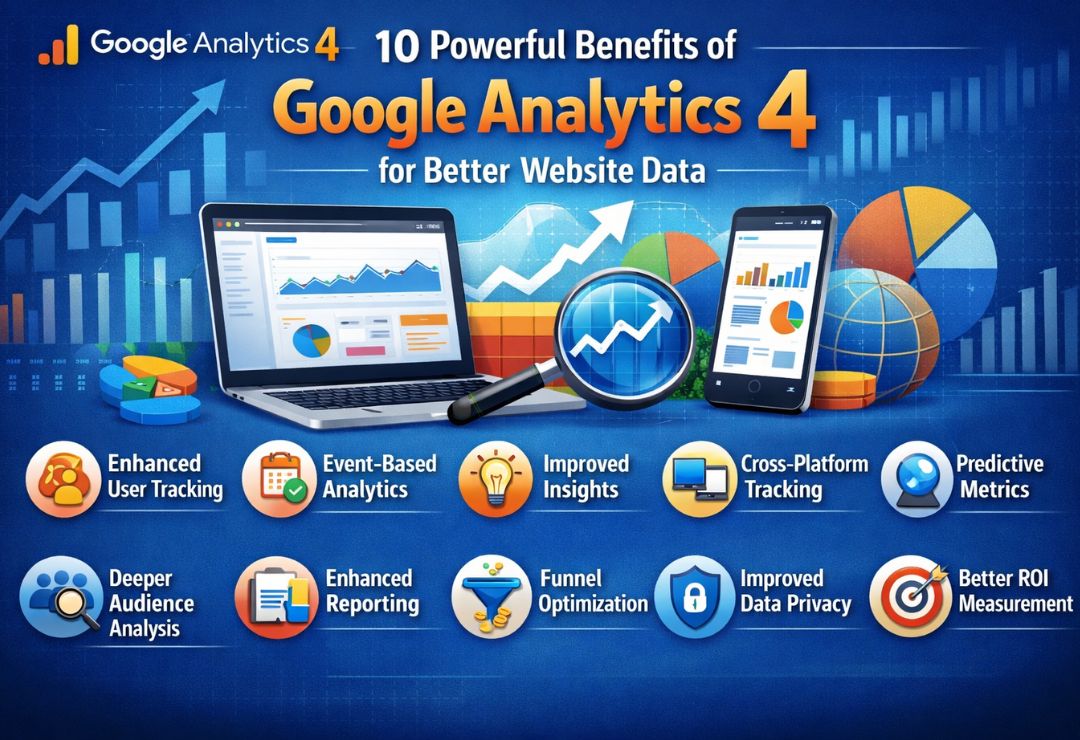
Adopting GA4 brings numerous advantages. It delivers better insights for marketing campaigns by attributing conversions across touchpoints accurately. This helps refine strategies and boost efficiency.
Improved tracking across devices is a game-changer. GA4 unifies user IDs, providing seamless journeys from mobile to desktop, unlike fragmented Universal Analytics views.
For businesses, GA4 is future-proof. With ongoing GA4 updates news incorporating AI and privacy tools, it adapts to regulatory changes and tech shifts.
Enhanced e-commerce reporting tracks product performance in detail, aiding inventory and pricing decisions. Plus, integration with Google tools like Search Console amplifies SEO efforts.
Ultimately, GA4 empowers data-driven cultures, turning raw data into actionable GA4 insights that drive revenue growth.
Common Mistakes to Avoid in GA4
One frequent error is neglecting event setup. Many users stick to default tracking, missing custom events that capture unique interactions. Always define key events aligned with business goals.
Another mistake: Ignoring data retention settings. GA4 defaults to two months for user data, which might be too short for long-term analysis. Adjust to 14 months if needed.
Overlooking filters can lead to inaccurate GA4 reports. Exclude internal traffic to prevent skewed metrics.
Don’t forget about consent management. With privacy laws, improper handling can result in data gaps or compliance issues.
Finally, resist comparing GA4 directly to Universal Analytics without context. Metrics like sessions differ, so focus on trends rather than absolute numbers.
Future of GA4 and Analytics Tools
Looking ahead, GA4 updates news points to deeper AI integration. Expect more automated insights and anomaly detection, reducing manual analysis time.
These changes impact online businesses by enabling hyper-personalized experiences. With better GA4 tracking, companies can anticipate user needs and optimize in real-time.
Emerging trends include zero-party data collection and federated learning for privacy-preserving analytics. GA4 will likely incorporate these, staying at the forefront.
Voice search and IoT tracking are on the horizon, expanding GA4’s scope beyond traditional web.
As digital analytics evolves, GA4 positions businesses for success in a data-rich world.
FAQs About GA4 Updates News
What are the latest GA4 updates in 2026?
Recent GA4 updates news includes Analytics Advisor for AI recommendations and expanded benchmarking for industry comparisons.
How does GA4 migration differ from Universal Analytics?
GA4 migration involves event-based setup and dual tagging to ensure continuity, focusing on user-centric data.
What GA4 features help with marketing?
GA4 features like predictive audiences and funnel explorations provide deep GA4 insights for targeted campaigns.
GA4 vs Universal Analytics: Which is better for tracking?
GA4 excels in cross-device GA4 tracking and privacy, making it superior for modern analytics needs.
How can I get GA4 tips for better reports?
Start with custom GA4 reports and enhanced measurement for comprehensive data visualization and analysis.
Conclusion
In summary, GA4 updates news continues to shape the landscape of digital analytics, with innovations like AI advisors and integrated cost data imports enhancing usability. Embracing GA4 features, migration strategies, and tips ensures businesses gain superior GA4 insights over Universal Analytics.
Stay informed on GA4 updates news to maintain a competitive edge. Regularly check Google’s resources and experiment with new tools to maximize your analytics potential. Your data-driven future starts now.